The number one most important question, is always going to be, "What is it for?" Once you have a clear idea of the purpose, and how it will be used, then you can start looking at fonts. We will talk about print media first, then electronic.
Lets go through some options for print media, as you read the list think of a solid purpose and goal each would have. Resume, research paper, newspaper, wedding invitation. Each one demands to be treated a different way, each one has a voice and the selected font has to complement that voice. Just like in a movie, if you are having a mushy lovey moment, you have to have music that complements it, not a techno beat.
A few important things to remember: Fonts are to enhance the experience not take away from it. Maybe you found a really cool font that you love to death- if the font itself is too noticeable, don't use it. In film- the editing is very very important, but you aren't supposed to notice it.
As far as print goes, serifed fonts work the best- at least for big blocks of text, news papers and journals use this font. Its usually a bit easier to read (not by much though), and dark text on light background is best, although not 100% black on 100% white. That contrast will kill your eyes. Use a lighter dark or a creamier background and it is much nicer.

Now- which serif font should you use? Don't use Times New Roman. That rule is fairly simple, its the default (not anymore though) for a lot of Microsoft programs, it has a history to it (London Times started using it around 1930) and it was semi standard in newspapers. However, Times New Roman has really awkward looking serifs (proportionally). There are other serifed fonts that are much nicer.
 As I said, Times is awkward. Goudy and Perpetua are very close but so much better. Calisto is nice, professional, but plesant. Centaur is a little too fancy for body text, but would be nice for headlines or headings.
One note about Wedding announcements before I move on. If you were to use a bubble text you would be saying something about yourselves, and your wedding. If I wanted to pretend I was a geek, I would use a pixel font. If I wanted to pretend I was a bad designer then I would use Papyrus. NEVER USE PAPYRUS.
OK, now onto electronic media- things you will see with a digital projector, on the web, email, pdf, tv, anything like that. Serifs can be used, but be really careful about them. Those fonts are a little more elegant and thin and have more detail which pixels can't usually show perfectly, making the font look a little distorted(you can see the distrotion on the above gif of serif fonts- thats because you are looking at a computer screen, if it was printed out, that would be a different story). SansSerif fonts are usually the ticket. Also, (I don't have any studies to cite for this, but I have noticed this) it seems light text or light objects on a dark background are easier to read, and much nicer on the eyes. This might have something to do with screens emitting the light which creates the shapes you see instead of the light being reflected, I don't know. (If you use some program a lot and you can change the skin to a darker one, see if its not easier on your eyes.)
 Arial is really over used, its kind of the default. The next three are nice, there is a lot of variation though. Tempus is sans, but is a bit more fancy than you want for a lot of text, but if you wanted a title that needs to look stylized, it would be great. There was one more font I wanted to put on this gif, but I didn't have it. I'd just like to say that I am in love with Optima font. Not for a lot of text, but for headlines, it looks so great...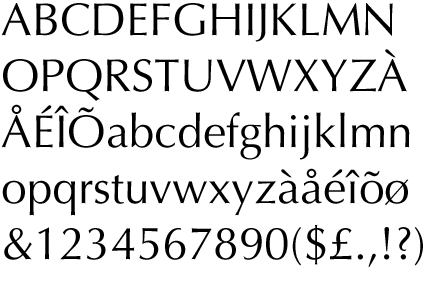
We are almost done. Another reason to not use Times New Roman is because it has terrible kerning. Kerning is the spaces between the letters. If you are going to make a title or a design you need to mess with all the values between the letters. Its a little tedious, but it really needs to be done as computers aren't smart enough to do it. Just look at two letters, if they are too close, move them apart, if they are too far apart, move them closer together- Do that with the whole title, its more important than you might think.
Ok, last thing- context. The most basic rule of thumb is tradition. You would never ever see a street sign with a serif font on it. You would never see a bank name written in a cursive or script font. You would never see warnings or cautions written in serif. Same with labels, cereal boxes, or most consumer packaging. Its all about convention. If you are going to write a more technical thing that is going to be shown on a website, use a sans font. If you are going to write a poem that will be in a book or magazine, use a serif font. Its not always about which has easiest legibility. It is more about what the type face's voice, and the conventions.
 These fonts are: Aenigma Scrawl, PsusdoSaudi, Sketchy, Inkburrow, Adore64, and Tengwar Annatar. Here is something you can all try at home. Write down 3 adjectives for yourself. Find one font for each of those adjectives, then find one font that matches all those adjectives to write your name. Its a lot of fun. Afterward, try to remember which fonts you used, and which adjectives they were really good at. Or since you are reading this now, try to come up with a list of adjectives for all 6 of the above fonts, or pull out your movie collection, and look at the movie title fonts and see why they were chosen.
No comments:
Post a Comment